
BTC Dump & Trend Alerts indicator
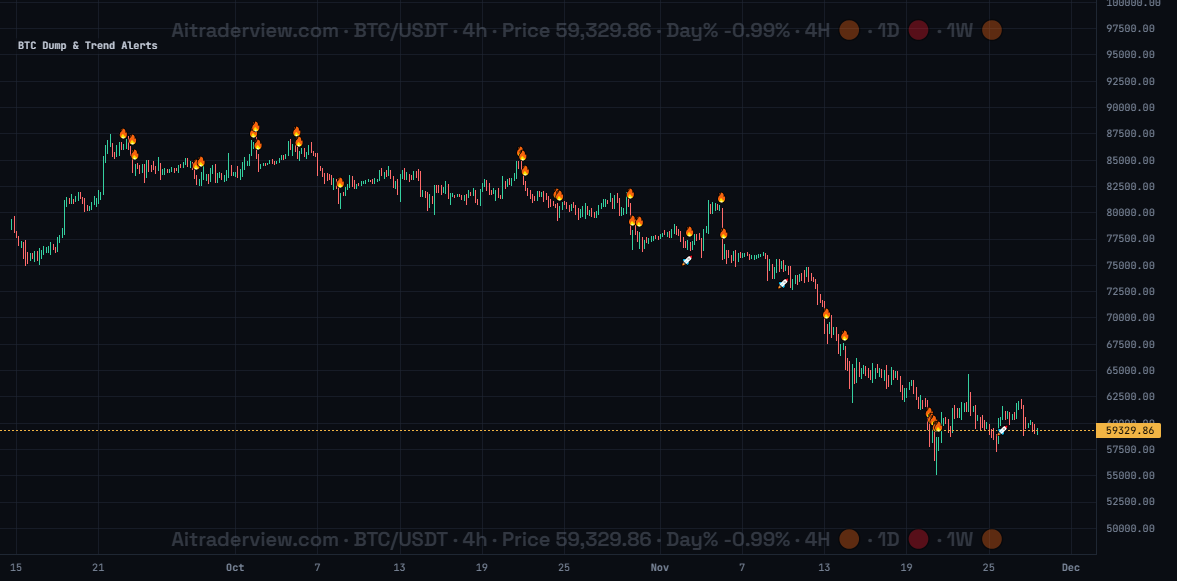
The screenshot shows BTC on the 4h timeframe with the flame and rocket markers on the candles.
1. Overview
| Property | Details |
|---|---|
| Indicator name | BTC Dump & Trend Alerts |
| Category | Sentiment and alerts |
| Type | Chart overlay (markers on the candles) |
| Display | A flame marker above the candle for a pre-dump or dump alert, a rocket marker below the candle for a trend start alert |
| Data | The BTC dump and trend start alerts of AiTraderView |
| Availability | Basic indicator, off by default. Shown on BTC charts only |
AiTraderView sends alerts when Bitcoin shows signs of a dump or the start of a new trend. These alerts are also sent via Telegram. This indicator puts the same alerts on your chart, on the candle where each alert was sent, so you can see them in the context of the price and check how they worked in the past.
2. Purpose of the indicator
What does it measure?
The moments when the AiTraderView alerts warned for a possible dump of Bitcoin, or signaled the start of a new trend.
When do you use it?
- To see a warning for a possible sharp drop on the chart.
- To see where a new trend started according to the alerts.
- To review how earlier alerts lined up with the price.
3. How to read the indicator
- 🔥 Pre-dump / dump (flame above the candle): an alert that Bitcoin may dump or is dumping.
- 🚀 Trend start (rocket below the candle): an alert that a new trend has started.
- Several flames close together show a period in which the alerts were repeated.
- The markers only appear on Bitcoin charts and on candles from the visible part of the chart.
4. Settings
| Setting | Default | Description |
|---|---|---|
| BTC Dump & Trend Alerts | Off | Show or hide the markers on the chart. |
| 🔥 Pre-dump / dump | On | Show or hide the flame markers. |
| 🚀 Trend start | On | Show or hide the rocket markers. |
5. Tips and combinations
- An alert is a warning and not a trade signal. Check it with the trend and the levels on your chart.
- Use the checkboxes to show only the flames or only the rockets if the chart gets crowded.
- Combine with trend indicators such as EMA Trend or SuperTrend to check the direction.
- Combine with Liquidation Heatmap and Levels to see where a dump could find support.
6. Disclaimer
This indicator and its data are for information only and are not financial advice.
Watch the Crypto Cockpit intro video:
Watch all our videos via this link:
https://aitraderview.com/youtube-videos/
⚠️ RISK WARNING & AI DISCLOSURE
- This information is generated by Artificial Intelligence (AI) and complex algorithms. While advanced, these systems can contain errors or inaccuracies and are for educational purposes only.
- Technical analysis provides no guarantees; this information is purely informative.
- All discussed scenarios are hypothetical and do not constitute predictions or expectations.
- Past performance is not an indicator of future results.
- This is not financial advice and is not intended as a call-to-action for the reader.
- No implicit direction is claimed, and no specific behavior of market participants is suggested.