
Put/Call OI indicator
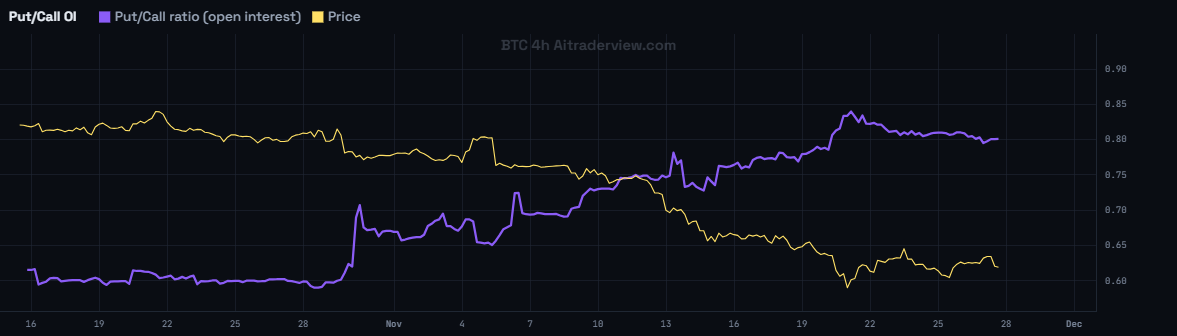
The screenshot shows BTC on the 4h timeframe with the Put/Call OI panel.
1. Overview
| Property | Details |
|---|---|
| Indicator name | Put/Call OI |
| Category | Options and derivatives |
| Type | Pane indicator |
| Display | A purple line for the put/call ratio, a reference line at 1.0 and a yellow price line |
| Data | The open interest of put and call options |
| Availability | Advanced indicator, off by default |
Put/Call OI shows how many put options are open compared with call options. Puts are used to bet on or protect against a fall, calls are used to bet on a rise. The ratio shows which side the options market leans to.
2. Purpose of the indicator
What does it measure?
The ratio of open put contracts to open call contracts (put/call ratio based on open interest).
When do you use it?
- To see if traders are positioned for a rise or a fall.
- To spot a crowded options market on one side.
- To follow how the options positioning changes over time.
3. How to read the indicator
- Put/Call ratio (purple line): open puts divided by open calls.
- Reference line at 1.0: puts and calls are equal.
- Above 1.0: there are more puts than calls. The market is cautious or hedging.
- Below 1.0: there are more calls than puts. The market is more optimistic.
- Yellow line: the price.
- Rising ratio: more put positions are being built, often during a fall.
4. Settings
| Setting | Default | Description |
|---|---|---|
| Put/Call OI | Off | Show or hide the panel. |
| Panel | Panel 26 | The panel slot where the indicator is shown. |
5. Tips and combinations
- Look at the trend of the ratio more than a single value. A steady rise shows growing caution.
- An extreme ratio can mean a crowded trade, which sometimes reverses.
- Combine with Skew 25Δ: both show fear, but one counts contracts and the other looks at prices.
- Combine with Options levels to see where the put and call walls sit on the chart.
6. Disclaimer
This indicator and its data are for information only and are not financial advice.
Watch the Crypto Cockpit intro video:
Watch all our videos via this link:
https://aitraderview.com/youtube-videos/
⚠️ RISK WARNING & AI DISCLOSURE
- This information is generated by Artificial Intelligence (AI) and complex algorithms. While advanced, these systems can contain errors or inaccuracies and are for educational purposes only.
- Technical analysis provides no guarantees; this information is purely informative.
- All discussed scenarios are hypothetical and do not constitute predictions or expectations.
- Past performance is not an indicator of future results.
- This is not financial advice and is not intended as a call-to-action for the reader.
- No implicit direction is claimed, and no specific behavior of market participants is suggested.