
Global PowerTrades indicator
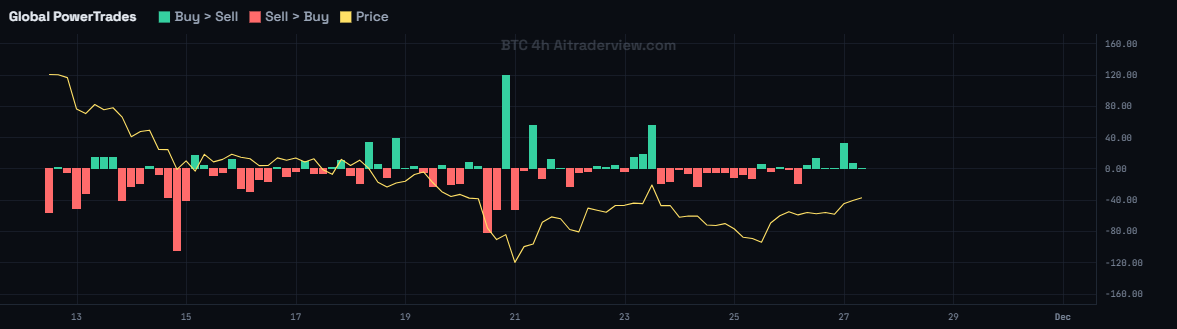
The screenshot shows BTC on the 4h timeframe with the Global PowerTrades panel in Count mode.
1. Overview
| Property | Details |
|---|---|
| Indicator name | Global PowerTrades |
| Category | Whales and smart money |
| Type | Pane indicator |
| Display | A histogram of net power trades of all coins together, green when buys dominate and red when sells dominate, with a yellow price line of the selected coin |
| Data | Power trades of all coins together |
| Availability | Advanced indicator, off by default |
Global PowerTrades works like PowerTrades, but instead of one coin it adds up the power trades of all coins together. It shows if big players are buying or selling across the whole market.
2. Purpose of the indicator
What does it measure?
The net of power buys and power sells per candle for all coins together, either as a number of trades (Count) or as a USD value (Value).
When do you use it?
- To see the mood of big players across the whole market.
- To check if a coin moves with or against the market.
- To spot market-wide buying or selling waves.
3. How to read the indicator
- Green bar (Buy > Sell): net buying by large trades across the market, above zero.
- Red bar (Sell > Buy): net selling by large trades across the market, below zero.
- Count / Value: the number of power trades or their USD value.
- Yellow line: the price of the coin you are viewing.
- Outliers: extreme bars are capped so the other bars stay readable.
4. Settings
| Setting | Default | Description |
|---|---|---|
| Global PowerTrades | Off | Show or hide the panel. |
| Panel | Panel 2 | The panel slot where the indicator is shown. |
| Count / Value | Count | Show the number of power trades or their USD value. |
5. Tips and combinations
- When Global PowerTrades and the PowerTrades of your coin agree, the move has broad support.
- When your coin is strong but the global flow is selling, be careful: the market is not behind it.
- Use a higher timeframe to filter out noise.
- Combine with PowerTrades and BTC Correlation.
6. Disclaimer
This indicator and its data are for information only and are not financial advice.
Watch the Crypto Cockpit intro video:
Watch all our videos via this link:
https://aitraderview.com/youtube-videos/
⚠️ RISK WARNING & AI DISCLOSURE
- This information is generated by Artificial Intelligence (AI) and complex algorithms. While advanced, these systems can contain errors or inaccuracies and are for educational purposes only.
- Technical analysis provides no guarantees; this information is purely informative.
- All discussed scenarios are hypothetical and do not constitute predictions or expectations.
- Past performance is not an indicator of future results.
- This is not financial advice and is not intended as a call-to-action for the reader.
- No implicit direction is claimed, and no specific behavior of market participants is suggested.