
Crypto Portfolio: 8 Smart Tools to Track and Grow Your Holdings
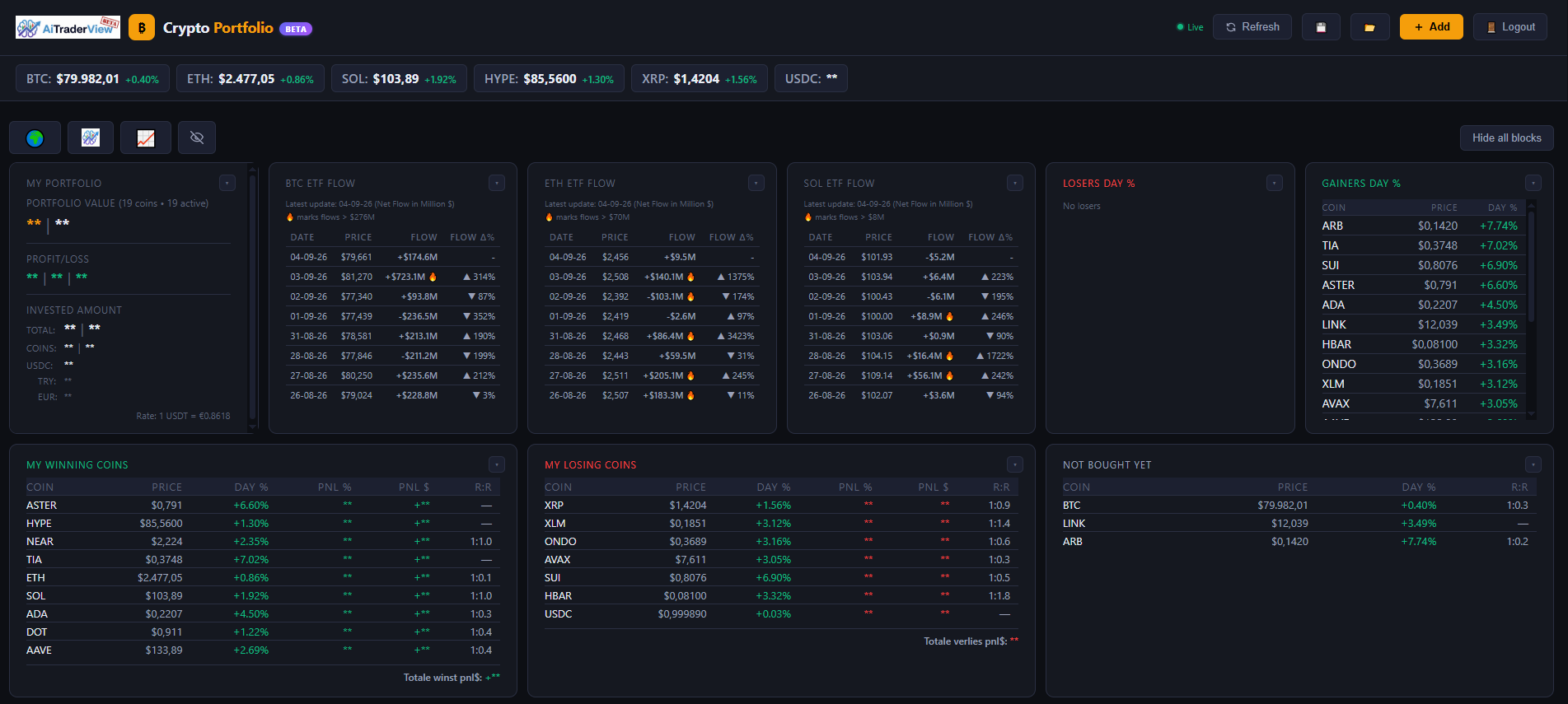
Know Exactly Where You Stand
Spreadsheets get outdated the moment prices move. Crypto Portfolio is a live dashboard that tracks what you actually hold, values it at real-time prices, and tells you — honestly — how each position is doing, without you touching a formula.
Here’s a breakdown of the 8 modules that make it work.
8 Modules for Total Portfolio Clarity
POSITION TRACKING
- Function: Log your holdings and invested amount per coin; average price, current value, and profit/loss update automatically from live prices.
- Utility: Always-current numbers, with zero manual recalculating.
TARGET PRICE & BUY SIMULATOR
- Function: Set a target as a price, a % gain, or a dollar value, and use the built-in “what if I buy more?” simulator to preview your new average price before you buy.
- Utility: Plan a position size or an exit level without leaving the app or doing the math yourself.
SUPPORT/RESISTANCE RISK-REWARD
- Function: Set your own support and resistance per coin; Crypto Portfolio automatically calculates a risk/reward ratio from the live price.
- Utility: Instantly see which of your positions have the most favorable setup left in them.
MODULAR DASHBOARD
- Function: Drag, resize, and reorder dashboard blocks (Allocation, Gainers/Losers, ETF Flow, Winning/Losing Coins, and more), with separate layouts remembered for desktop and mobile.
- Utility: A dashboard that fits how you actually trade, on whatever device you’re using.
ETF FLOW BLOCKS
- Function: Daily net inflow/outflow for BTC, ETH, and SOL spot ETFs, with a threshold marker for notably large flow days.
- Utility: A direct read on institutional buying or selling pressure, without leaving your portfolio view.
⭐ SMART FILTERS
- Function: Star-based categories like “Best bullish setup,” “Best risk/reward setup,” and “Best recovery/reversal candidate,” generated from AiTraderView’s own market analysis.
- Utility: Cuts through a large watchlist to show you which of your coins actually deserve attention right now.
MY WINNING / LOSING COINS
- Function: An automatic split of your holdings into currently profitable, currently unprofitable, and not-yet-bought coins, each with a running total.
- Utility: An honest, at-a-glance read on portfolio performance — no cherry-picking your favorite position.
EXPORT, IMPORT & SYNC
- Function: Your portfolio saves and syncs automatically across devices, with one-click JSON export/import for manual backups.
- Utility: Your data follows you, and a backup is always one click away.
Why Use Crypto Portfolio?
Guessing your average price or eyeballing your risk/reward doesn’t scale past a couple of coins. Crypto Portfolio turns your holdings into a live, self-updating dashboard — free to use, synced across your devices, and built to pair directly with Crypto Cockpit’s charts and shared levels. If you own crypto, this is the page that tells you the truth about how it’s actually going.
How to open Crypto Cockpit and Crypto Portfolio
- Log in to your account at aitraderview.com.
- Click Launch App.
- Click Start to enter the application.
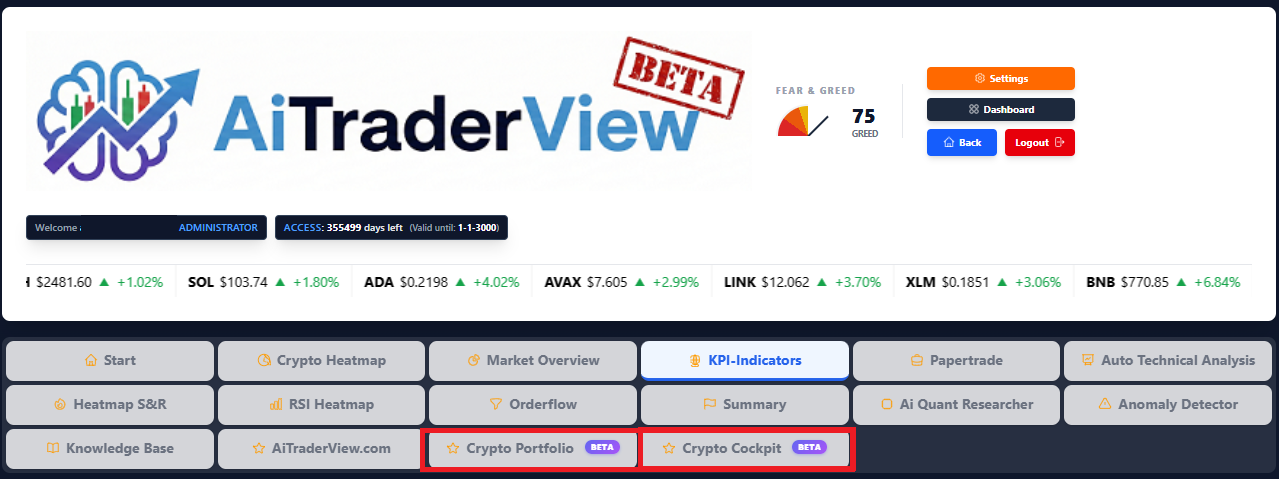
- In the main menu, you’ll now see two new tiles: Crypto Cockpit and Crypto Portfolio. Click either one to open it.
That’s it — no separate signup, no extra setup. Both are available immediately with your existing account.
⚠️ RISK WARNING & AI DISCLOSURE
- This information is generated by Artificial Intelligence (AI) and complex algorithms. While advanced, these systems can contain errors or inaccuracies and are for educational purposes only.
- Technical analysis provides no guarantees; this information is purely informative.
- All discussed scenarios are hypothetical and do not constitute predictions or expectations.
- Past performance is not an indicator of future results.
- This is not financial advice and is not intended as a call-to-action for the reader.
- No implicit direction is claimed, and no specific behavior of market participants is suggested.