
Crypto Cockpit: 12 Powerful Tools to Chart Like a Pro
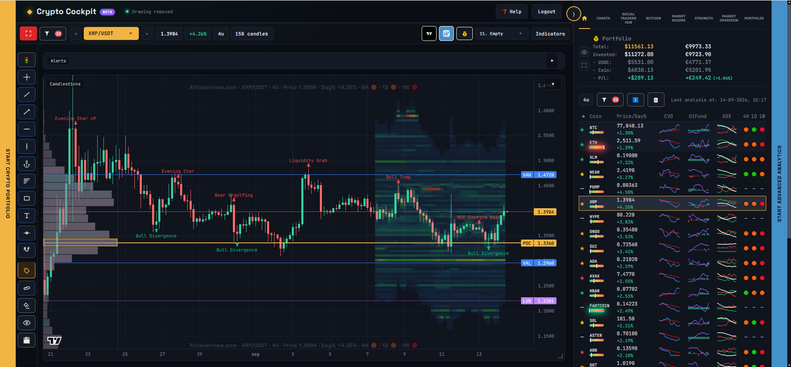
Your Entire Trading Desk, In One Screen
Most traders juggle a charting platform, a levels spreadsheet, a few Telegram groups for other people’s calls, and a separate tab for “what’s the market even doing today.” Crypto Cockpit collapses all of that into a single live workspace — a real-time chart, a full indicator suite, your own price levels, automated market intelligence, and a built-in social network of other traders, all updating together in one screen.
Below is a breakdown of the 12 modules that make up Crypto Cockpit.
12 Modules for Faster, Sharper Charting
CHART (Live Candlesticks & Drawing Tools)
- Function: A live candlestick chart with Fullscreen mode, Trendline, Measure, Fibonacci, and Rectangle drawing tools, plus a one-click “My Av. Price” line pulled straight from your portfolio.
- Utility: Everything you’d normally need a separate TradingView tab for, built directly into the same screen as your levels and alerts.
INDICATORS (Main Chart Overlays)
- Function: EMA/SMA trend stacks (8/20/50/200), multi-session VWAP, Trend Structure (HH/HL/LH/LL), Smart Money Concepts (FVG, BoS, ChoCH), Premium/Discount zones, Squeeze Check, candlestick pattern recognition, and an Orderbook Heatmap.
- Utility: Every major technical framework overlaid on your own chart, fully customizable per line — color, width, on/off — and saveable as a reusable Indicator Profile.
PANEL INDICATORS
- Function: 12+ dedicated panels including PowerTrades, Whale Buy/Sell ratio, CVD & Momentum, Open Interest & Funding, Top Long/Short account ratios, RSI, ADX, and Relative Volume.
- Utility: Positioning and derivatives data most retail charting tools don’t expose, arranged in whatever order suits your workflow.
ALERTS
- Function: An automated notification bar that flags momentum shifts, key VWAP tests, and overextended price conditions the moment they occur.
- Utility: Removes the need to babysit a chart — the system watches the technical conditions for you.
LEVELS (Pinned & API)
- Function: Your own pinned support/resistance, plus API-generated levels ranked by strength and filtered by range.
- Utility: A structured way to keep your key price zones visible without cluttering the chart with guesswork.
🌐 SOCIAL TRADERS HUB
- Function: A public trader network built into Cockpit — set up a profile, get discovered, follow traders you trust, and see their approved, pinned levels appear directly on your own chart.
- Utility: Turns Cockpit from a solo tool into a shared one. This is the feature we expect traders to talk about most — free, built-in, and the fastest way to see how other traders read the same chart you do.
START (Full Market Scan)
- Function: A single table scanning every coin you track — price, day %, CVD, Open Interest/Funding, ADX, and 4H/1D/1W trend — with BTC and ETH pinned at the top.
- Utility: A 5-second market check before you even open a chart.
COINSTATS
- Function: A sortable table across all your coins with EMA distance, RSI/Stochastic/MFI, ADX, and Squeeze Radar readings.
- Utility: Instantly surfaces which coins are stretched, trending, or coiling — across your whole watchlist at once.
INFO
- Function: An auto-generated written summary of the selected coin’s trend and classification.
- Utility: A plain-English read of the technical picture, without having to interpret ten indicators yourself.
BITCOIN INTELLIGENCE
- Function: An automatically refreshed “72H intelligence” briefing focused specifically on Bitcoin.
- Utility: Keeps you aligned with the asset that moves the rest of the market, without extra research.
MARKET REGIME
- Function: A composite bullish/neutral/bearish score for the overall crypto market, a category ranking, and a per-coin regime breakdown.
- Utility: Tells you what kind of market you’re trading in today — trend-following conditions or a chop zone — before you place a single trade.
- Fully Ai powered
EXPORT & SIDE PANELS
- Function: One-click and bulk PNG chart export, full JSON backup/import of your settings, and slide-out side panels for Crypto Portfolio and Advanced Analytics.
- Utility: Your entire setup is portable, backed up, and never more than one click from your portfolio or deeper analytics.
Why Use Crypto Cockpit?
Manually cross-referencing a chart, a levels sheet, and a few other traders’ opinions costs time you could spend actually trading. Crypto Cockpit automates the technical layer and adds a real trading community on top of it — and it’s completely free. Whether you’re a professional running a full multi-timeframe process or someone who just wants a cleaner, smarter way to watch the market, Cockpit is built to be the one tab you open first.
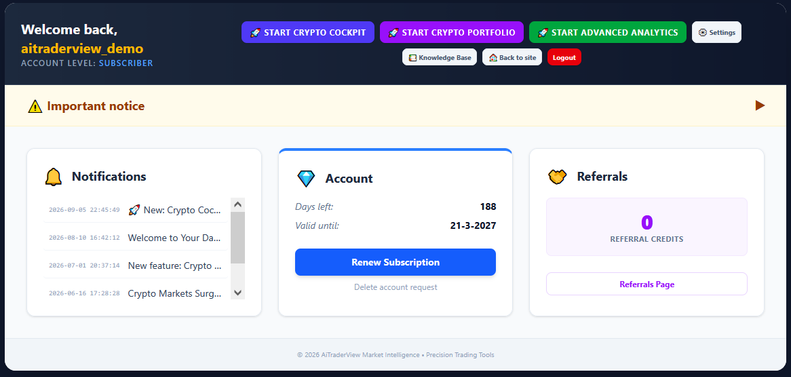
How to open Crypto Cockpit and Crypto Portfolio
- Log in to your account at aitraderview.com.
- Click Launch App.
- In the Welcome screen, you’ll now see Crypto Cockpit . Click to open it.
That’s it — no separate signup, no extra setup. Both are available immediately with your existing account.
⚠️ RISK WARNING & AI DISCLOSURE
- This information is generated by Artificial Intelligence (AI) and complex algorithms. While advanced, these systems can contain errors or inaccuracies and are for educational purposes only.
- Technical analysis provides no guarantees; this information is purely informative.
- All discussed scenarios are hypothetical and do not constitute predictions or expectations.
- Past performance is not an indicator of future results.
- This is not financial advice and is not intended as a call-to-action for the reader.
- No implicit direction is claimed, and no specific behavior of market participants is suggested.